For auto spare parts distributors B2B ordering
portal. AI-assisted
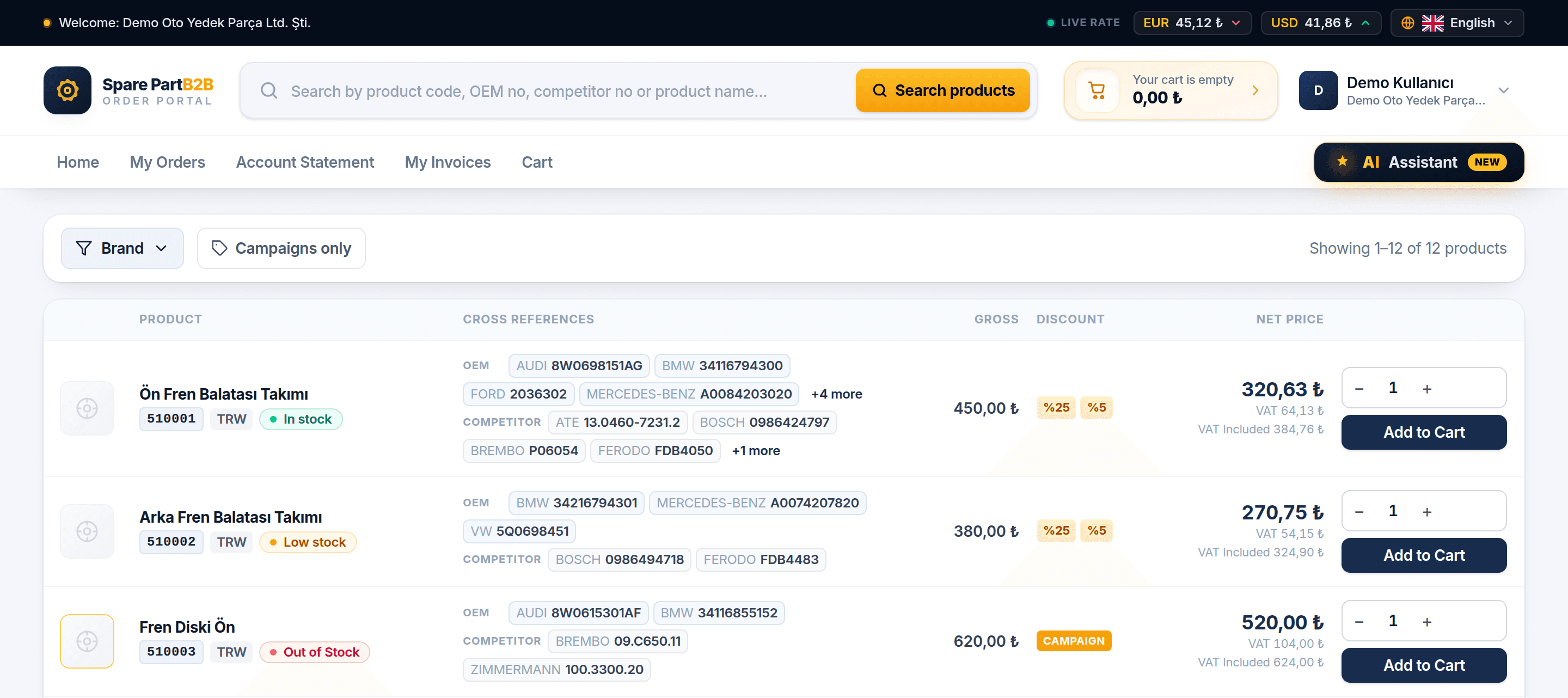
Your dealers search for a part by its OEM or cross-reference code, see their own net price and stock, place the order and follow their account. The AI assistant answers routine questions and speeds up ordering, so your team spends less time on the phone. No server to set up.
- ERP
- stock, prices and accounts from your ERP
- 24/7
- dealers order outside office hours too
- 20
- languages, right-to-left included
I need 8W0698151AG, 2 sets. Is it in stock?
This product matches 8W0698151AG. The price is your own net price:
Add 2 sets. What's my balance?
2 sets of 510001 are in your cart. Your balance is €3,120.00; €410.00 of it is overdue.
Built for
auto spare parts.
Not a generic e-commerce platform. Designed around the dealer looking for a part and the distributor supplying it.
SearchOEM, cross-reference code or free text.
Net priceCustomer group discounts, campaigns and exchange rates in one calculation.
Orders and shippingFrom cart to order; shipping status per line item.
ERP connectionProducts, stock, prices, statements and invoices flow in via API.
Search that understands part numbers
Dealers search with whatever number they have and land on the right part.
Each dealer's own net price
Discounts, campaigns and exchange rates already applied, with the full breakdown on the dealer's screen.
Dealers order straight from their own system
Your dealers search products, place orders for their own customers and track them from their own software.
Same job,
two ways.
Your dealer's customer sent a long parts list on WhatsApp.
- Searches the codes on the list one by one.
- Adds each line to the cart separately.
- Goes back to the list to see what is out of stock.
- Switches to the account page to see the balance.
- Pastes the list: “Price this.”
- Every line comes with the dealer's own price; out-of-stock items are listed separately.
- Says “put them in my cart” and approves the order.
- Asks about the balance in the same chat.
Now the portal
answers
these questions.
The routine questions your sales reps get by phone and WhatsApp. Your dealer gets the answer even at midnight, and your team gets back to real work.
- Price
How much is this part for me?
The dealer's own net price, with discounts, campaigns and exchange rate applied.
- Stock
Is there an equivalent? Is it in stock?
With OEM and equivalent codes and current stock.
- Shipping
Has yesterday's order shipped?
Shipped lines, carrier and tracking number.
- Account
What's my balance? Anything overdue?
Balance, statement, overdue amounts and invoices.
- History
Which brand did I buy most this year?
The dealer asks about their own purchase history and gets the answer right away.
An assistant on every page
The dealer asks while browsing the portal. Answers come with clickable product cards; “Add to cart” adds to the real cart. The assistant runs on your AI account.
Order from ChatGPT and Claude
The dealer connects your portal to their own ChatGPT or Claude app; no keys, no setup. The dealer uses this channel with their own subscription, so it costs you no AI fees.
Everyone sees only their own data
Each dealer sees only their own prices, orders and balance; they cannot reach another dealer's data.
Who has it, and how much?
You decide which dealers get AI, and you set a monthly usage limit per dealer for the portal assistant.
The dealer has the last word
The dealer can have AI prepare the cart and approve the order themselves, or let it place the order directly.
How your
portal goes live
Setup starts the moment payment is confirmed. Servers, certificates and backups are on us.
- STEP 1 · ~1 min
Account
Sign up with your email and click the verification link.
- STEP 2 · ~2 min
Billing details
Company name, tax number and address. Currency and payment method follow your billing country.
- STEP 3 · ~1 min
Address and period
Pick your portal address:
firma.s1. spare-part-b2b. com - STEP 4 · ~2 min
Payment
Pay by credit or debit card on a secure payment page. Your portal opens as soon as the payment is approved.
- STEP 5 · a few min
Your portal is ready
Setup takes a few minutes; we email you when it is ready. You create your admin password in the panel and sign in.
- Company name, tax office and number, billing address
- Credit or debit card
- A short name for your portal, such as your company name
- Your product list: an Excel/CSV file or your ERP
- Create your admin password and sign in.
- Upload your products or connect your ERP.
- Set up discount groups so each dealer sees their own price.
- Add your first dealer and invite them.
- Connect your AI account and turn the assistant on for your dealers.
Ready in 20 languages
Every user works in their own language. Arabic and Persian display right to left.
 Türkçe
 English
 Deutsch
 Azərbaycanca
 العربية
 فارسی
 Italiano
 Français
 Español
 Polski
 Română
 Български
 Ελληνικά
 Srpski
 Hrvatski
 Bosanski
 Slovenščina
 Македонски
 Shqip
 Русский
One price.
Everything included.
No need to choose between plans. Pick your billing period and your portal opens with every feature.
equals $115.83 per month · save 17% · no tax added
Open your portalMonthly or yearly · cancel any time
- Included
- Your own domain + SSL✓
- Reach your dealer network in 19 languages✓
- ERP integration API✓
- Dealer ordering API and MCP✓
- AI sales assistant✓
- 2 GB disk✓
- Backups✓
AIOptional; without it the portal works fully and costs nothing extra. If you turn it on, the portal assistant connects to your own AI account; you pay usage directly to the provider, we add nothing on top. What your dealers do from their own ChatGPT or Claude app costs you nothing.
No tax is added to EUR and USD prices; tax in your own country is your responsibility. Abroad we sell to companies only.
Common questions
All questionsDo I need technical knowledge to set up?
No. Servers, database, certificates and backups are handled by us. You pick your address and pay; the portal is set up and you create your admin password in the dashboard.
What do I pay extra for AI?
AI is entirely optional. If you don't turn it on, you pay nothing extra, and the portal works as a complete B2B portal with search, dealer-specific prices, orders, customer accounts and ERP connection. If you do, the portal assistant connects to your own AI account: you pay usage fees directly to the provider, we add nothing on top, and you set a monthly limit per dealer. What your dealers do from their own ChatGPT or Claude app costs you nothing; they use it with their own subscription.
Is there a free trial?
We don't offer a separate trial period; instead, you can try every feature at your own pace in the live demo, which resets every night. When you're ready, start monthly and switch to yearly from your dashboard whenever you like.
Your dealers could be ordering tomorrow morning.
Pick your address, pay, and your portal goes live today.